AR Sketch : Sketch & Trace
NowTech - Halo GroupArt & Design
3.97.00 Reviews
- Version
- 1.1.4
- Installs
- 500.00K
- Age Rating
- Everyone
Screenshots
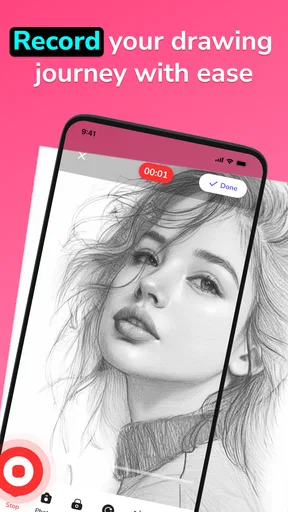
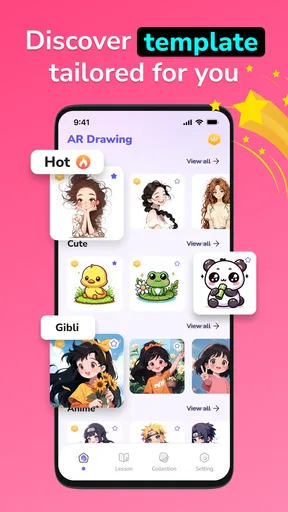
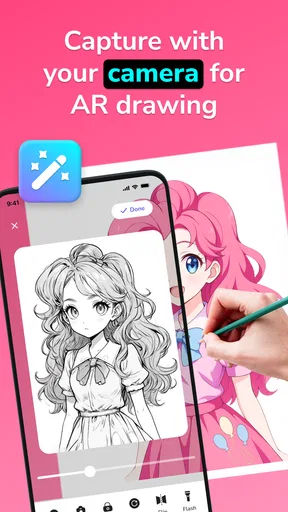

Our Review of AR Sketch : Sketch & Trace
 Analysis by Appyee
I tried AR Sketch : Sketch & Trace as a casual drawing companion, and its appeal is easy to understand: it turns a phone camera into a guide for tracing photos and creating anime- or cartoon-style sketches. It sits in the Art & Design category, but it feels less like a full digital studio and more like a practical bridge between an image on your screen and a drawing on paper.
That distinction matters. If you want layers, detailed brush controls, polished editing, or a complete illustration workflow, this is not the kind of app I would put ahead of a dedicated drawing platform. If you want help getting proportions onto paper, testing a character idea, or making a quick stylized sketch without starting from a blank page, it has a clearer purpose. I found the best results came from treating it as a tracing and practice tool rather than expecting it to replace traditional drawing skills.
How the app works in everyday use
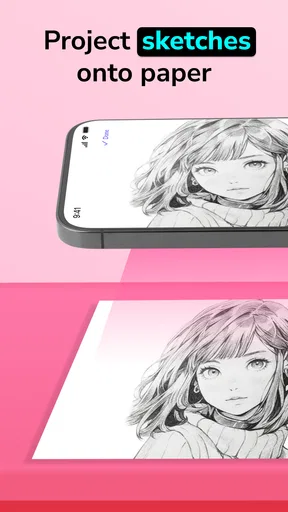
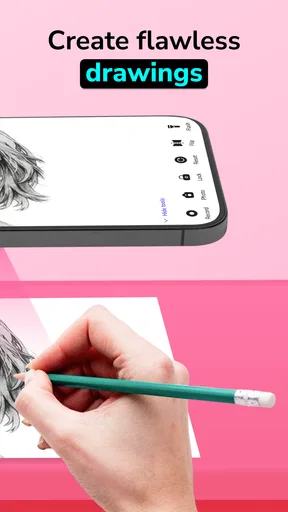
The basic experience revolves around choosing a photo or visual reference, applying its anime or cartoon treatment, and using augmented-reality guidance while drawing. The phone becomes a visual aid: you look through the camera and follow the projected reference with a pencil, pen, or marker on a surface in front of you.
This approach is useful because it separates two difficult tasks. First, the app helps organize the shapes and proportions. Then, you make the physical marks yourself. That makes the result feel more personal than simply applying a filter and saving an image, although the quality still depends heavily on how steadily you place the phone and how carefully you trace.
I would not describe the process as automatic drawing. The app can guide your hand, but it cannot correct a shaky line, improve paper texture, or decide where your shading should go. Beginners should see it as training wheels: helpful for understanding outlines and placement, but not a substitute for practicing eyes, faces, hands, perspective, and composition without assistance.
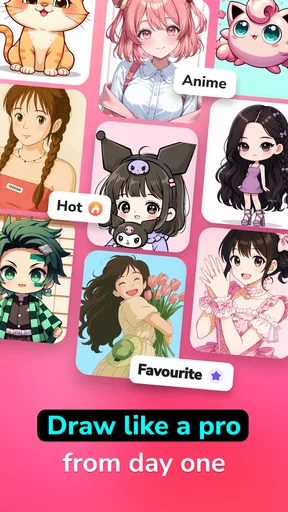
The anime and cartoon focus also gives the app a more specific character than a general camera editor. It is better suited to portraits, simplified characters, playful avatars, and stylized references than to serious photo retouching. A complicated landscape or a busy group photograph may produce a reference that is difficult to follow on paper, especially when several edges overlap.
What I would use it for
My favorite use case is a short, low-pressure drawing session. I can choose a clear portrait, reduce the visual complexity through the app’s stylized treatment, and work from the large shapes before adding small details. This is more approachable than opening a blank canvas and wondering where to begin.
It also makes sense for a parent or teacher looking for a simple art activity. A child can pick a familiar image, watch the outline appear through the camera, and concentrate on hand control. The Everyone content rating makes that audience easier to consider, though an adult may still need to help with phone positioning and the practical setup.
Another worthwhile workflow is using the app to study expressions. Instead of tracing an entire image in one pass, I would pause at the head shape, eye line, nose, mouth, and hair silhouette. That turns a quick effect into a more useful exercise. After repeating the process with several references, I would try drawing the same features without the overlay to see which proportions I actually learned.
A less obvious benefit is that the app can help reveal when a reference is too complicated before I waste paper on it. If the projected image is cluttered or the outlines are hard to distinguish, I can switch to a simpler portrait or crop the subject more tightly. This small selection decision often matters more than the effect itself.
Keeping the physical setup steady
AR drawing tools are sensitive to the relationship between the phone, the paper, and the viewing angle. I get a more usable guide when the device stays still and the drawing surface does not move. A basic stand or improvised support is therefore more valuable than many new users expect. Holding the phone in one hand while drawing with the other makes the alignment drift and can turn an easy outline into a frustrating one.
Lighting also affects the experience. Strong reflections on the screen or a dark workspace make it harder to see both the reference and the paper. I prefer a bright, even setup and a sheet with enough room around the subject. Starting with a small, highly detailed image is usually a mistake; a clear head-and-shoulders portrait gives the overlay a much better chance of being useful.
I recommend beginning with light pencil marks. The first pass should establish the outer silhouette and major internal lines, not commit to every detail. Once the proportions look right, I can reinforce the lines and add personal changes. This is where the app becomes more than a copying device: the reference gives structure, while the final choices remain mine.
Cost, free access, and what the paid option means
AR Sketch : Sketch & Trace is free to install, so trying the central idea does not require an upfront payment. That makes it easy to test whether AR tracing suits your drawing habits before spending anything. The app includes in-app purchases priced from $6.99 to $11.99 per item, so the free entry point should not be confused with every possible part of the experience being free.
I appreciate that the cost question is relatively straightforward at the starting point: you can explore the app without buying it first. The more important decision is whether the paid additions would improve your personal workflow enough to justify their price. Someone who only wants occasional tracing may find the free experience sufficient, while a frequent user may place more value on whatever extra access is offered inside the app.
I would avoid paying simply because the concept sounds convenient. First, I would test several reference types, including a simple portrait, a cartoon-like image, and a more detailed photo. I would also check whether the available tools fit the way I actually draw. If the camera guidance feels unstable in your usual setup, a purchase is unlikely to solve the underlying issue of positioning, lighting, or paper movement.
The paid value is therefore personal rather than automatic. For a learner who uses the app several times a week, a smoother or broader workflow could be worthwhile. For somebody who wants one quick sketch, a conventional printed reference, a transparent sheet, or a normal drawing app may be more economical and less dependent on camera alignment.
Where the value is strongest
The strongest value comes from lowering the intimidation of a blank page. Many beginners know what they want to draw but struggle to estimate size and placement. An AR guide gives them a starting structure without requiring advanced software knowledge. That can lead to more practice, which is more important than producing one impressive finished picture.
There is also value in the physical result. A regular digital filter gives you a transformed image, but tracing through the camera can produce something you can keep, color, display, or give away. That makes the app appealing for handmade cards, personal gifts, sketchbook studies, and casual creative time away from a conventional digital canvas.
Still, I would judge the purchase by repetition. If you use it once and return to a standard image editor, the free installation has already served its purpose. If it becomes part of a steady practice routine, the paid tier deserves consideration only after you have identified the exact convenience you need. That is a healthier way to evaluate it than assuming any paid item automatically represents better artistic results.
Tradeoffs compared with familiar alternatives
Compared with tracing paper or a printed reference, this app is more flexible because the image can be stylized and viewed through the camera. You do not need to print every reference, and changing subjects is quicker. The tradeoff is that the phone must remain correctly positioned, and the overlay can feel less natural than a stable physical image.
Compared with a standard drawing app, AR Sketch : Sketch & Trace is more focused on the connection between a digital reference and a real-world surface. A drawing app is usually better when I want undo controls, layers, precise color work, or a completely digital illustration. This app is better when the goal is to practice or create on paper while still using a phone-based guide.
Compared with a camera filter app, it offers a more active form of creativity. A filter can transform a photo instantly, but it does not ask me to develop hand control. Here, the transformation is a starting point rather than the final product. The cost is time: I have to set up the scene, align the device, and actually draw.
Compared with a professional illustration tool, the difference is even clearer. Professional software rewards users who need control over brushes, layers, editing, and export-oriented workflows. This app is simpler and more approachable, but that simplicity also limits how far I can take a finished piece inside the same environment. I would not choose it for a serious commission or a complex multi-stage digital artwork.
Limitations I noticed in the concept
The biggest friction is physical alignment. Even a good reference becomes unhelpful if the phone shifts while I work. The app can guide the visual placement, but it cannot make a handheld setup behave like a fixed drawing projector. Users who expect perfect registration without a stand may become disappointed quickly.
Reference quality is another important limitation. A clean, well-lit image with a distinct subject is easier to trace than a dark photograph full of overlapping details. Stylization may simplify some shapes, but it can also remove subtle information that matters for likeness. For portraits, I would keep the first attempts simple and avoid judging the app by one difficult image.
The experience also favors people who enjoy drawing with physical tools. If you prefer tapping, filling, and refining entirely on a screen, the AR element may feel like an unnecessary step. Conversely, traditional artists who already sketch confidently may find the guidance restrictive rather than helpful. The sweet spot is someone who wants a little structure but still enjoys making the marks by hand.
Because the app is relatively focused, its usefulness may depend on how often you draw. It is not a general-purpose art workspace that I would open for every creative task. I see it as a specialized tool for tracing, stylized references, and beginner-friendly practice. That focus is a strength when it matches your goal and a weakness when you need broader editing features.
Who should try it and who should skip it
I would recommend trying it to beginners who freeze when faced with an empty sheet, fans of anime and cartoon portraits, and anyone who wants to turn personal photos into handmade sketches. It can also suit hobbyists who want a quick activity with a visible result rather than a long digital editing session.
It is particularly useful for learning proportion in a controlled way. I would trace the main construction lines first, then hide or ignore the guide and redraw the same subject from memory. That two-stage method gives the app a teaching role instead of making every drawing dependent on the overlay. It is one of the more practical ways to get lasting value from a tracing tool.
I would be more cautious if you need professional illustration controls, advanced photo editing, or a fully digital workflow. In those cases, a dedicated drawing or image-editing app is likely the better choice. I would also skip it if you dislike setting up a stable phone position or if your main interest is applying instant effects without drawing yourself.
Families should find the Everyone rating reassuring as a general audience signal, but the real suitability still depends on the user’s patience and motor skills. Younger children may enjoy the novelty, while older beginners may get more educational value by slowing down and comparing their traced result with an unassisted drawing afterward.
Practical advice before committing to regular use
Start with a simple image and a large sheet. Use a light pencil, secure the phone, and complete only the outer shapes on the first attempt. If the result looks wrong, do not immediately blame the app; check whether the reference was too detailed or whether the device moved during the drawing.
For a realistic everyday scenario, imagine having a free evening and wanting to make a small birthday card. I would choose a clear portrait or cartoon subject, use the AR guide to establish the face and hair, then put the phone aside and add colors, a background, and a handwritten message. The app handles the intimidating first structure, while the personal additions keep the card from looking like a mechanical copy.
Another useful habit is to save the finished paper beside the original reference and note which parts were hardest. If the eyes are repeatedly misplaced, practice them separately. If the overall head shape is the problem, choose references with clearer profiles. This turns casual use into targeted improvement and helps you decide whether the app is genuinely helping.
My verdict after using the app
AR Sketch : Sketch & Trace is a focused, approachable Art & Design app from NowTech - Halo Group. It has reached over 500 thousand installs and holds a 3.9 average from around 926 ratings, which suggests a reasonably broad audience but also leaves room for individual experiences to vary. Its current version is 1.1.4, and it runs on Android 7.0 or later.
My recommendation is to install it if you want a free way to test AR-assisted tracing, especially for anime and cartoon-style sketches on paper. The concept delivers real value when you use it as a starting framework, a practice aid, or a way to make handmade projects less intimidating. The free installation makes that trial sensible.
I would not call it an all-purpose art solution, and I would not buy an in-app item before confirming that the basic workflow feels comfortable in your own space. The $6.99-to-$11.99 purchase range can make sense for a regular user who benefits from the added access, but it is harder to justify for occasional experimentation.
My bottom line: try it free if you want guidance while drawing by hand, but skip the paid route unless it becomes a repeated part of your creative routine. For beginners and casual makers, that is a fair proposition. For experienced digital artists or anyone seeking complete illustration control, a dedicated drawing app remains the better destination.
Verdict
Strengths of AR Sketch : Sketch & Trace
- Turns your phone into a practical AR drawing guide.
- Useful for beginners learning proportions and basic shapes.
- Supports tracing from photos without needing special equipment.
- Portable reference tool for drawing at home or outdoors.
- Simple interface makes it quick to start a new sketch.
Limitations of AR Sketch : Sketch & Trace
- Requires a steady phone position for accurate tracing.
- Camera permissions are necessary for the AR features.
- Screen brightness can make long drawing sessions drain battery.
- Small displays may feel limiting for detailed artwork.
- Some tools or content may require in-app purchases.
Similar Picks in This Category
View All
Canva: AI Photo & Video Editor
Canva4.8

PENUP – Drawing-sharing SNS
Samsung Electronics Co., Ltd.4.5

Crafto
Kutumb App4.6

Sketchbook
Sketchbook4.1

ibis Paint X
ibis inc.4.5

Adobe Express: AI Photo, Video
Adobe4.6
Frequently Asked Questions
What is AR Sketch: Sketch & Trace, and how does it work?
AR Sketch: Sketch & Trace is a drawing assistant that uses augmented reality to place a virtual image, outline, or reference over the real-world view through your device’s camera. After selecting or importing an image, you can position your phone above paper or another surface and follow the projected lines while drawing. It is designed to help beginners practice proportions and recreate references more easily.
Do I need any drawing experience to use AR Sketch: Sketch & Trace?
No advanced drawing experience is required. The app is mainly intended for beginners, students, hobby artists, and anyone who wants guidance while sketching. Its overlays can make it easier to understand shapes, placement, and proportions, although the final result still depends on your hand control and the stability of your setup. It assists your drawing rather than creating the artwork automatically.
Does AR Sketch: Sketch & Trace require a camera, and does it work offline?
The camera is an essential part of the experience because the app needs to display the drawing reference over your physical workspace. You should grant camera permission when requested and use a device with a compatible camera and motion sensors. Some tools or saved references may work without an internet connection, but online image libraries, advertisements, updates, or account-related features can require internet access.
Can I use my own images with AR Sketch: Sketch & Trace?
The app is generally designed to let users work with reference material, which may include images available inside the application and, depending on the current version, pictures selected from the device. This is useful for practicing portraits, objects, characters, and simple illustrations. Before importing an image, check the app’s available permissions and remember that copyrighted pictures should only be used in ways permitted by their owners.
What should I know before downloading AR Sketch: Sketch & Trace?
Before downloading, make sure your phone supports the required camera and augmented-reality functions and that you have enough free storage for the app and any saved projects. The experience is usually more comfortable on a stable stand or tripod, since moving the phone can misalign the overlay. Also review the store listing for current pricing, advertisements, in-app purchases, privacy permissions, and device compatibility.
